.webp)

Canon tm 510m 610m New release
New from Canon
Two new imagePROGRAF multifunction printers, 24 inch and 36 inch
The TM-510M and TM-610M build the scanner into the printer. Ask us about availability and pricing.
- 20 secondsA1 CAD drawing on the TM-510M, Fast Economy mode
- 600 dpiOptical scan resolution on both models
- 1 IP addressOne network connection for printer and scanner
A separate plotter and wide-format scanner means two machines, two network setups, and a walk across the office every time someone needs a copy of an A1 drawing. Canon's new imagePROGRAF TM-510M (24 inch) and TM-610M (36 inch) do both jobs in one compact unit, with one power cable and one IP address.
We have been through Canon's datasheet for both models. This post covers what each machine does, the speeds and specifications that matter for a CAD or poster workflow, and a few things worth checking before you specify one.
Which model is which
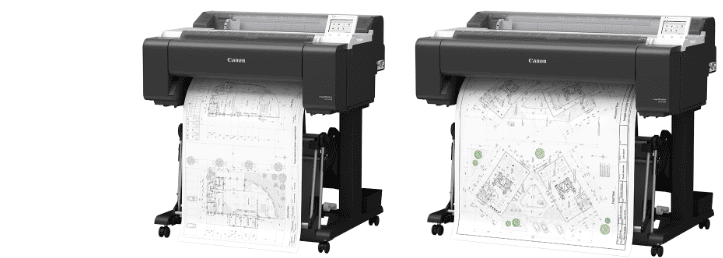
imagePROGRAF TM-510M
24 inch, prints A1
- Roll or cut sheet media from 203.2 to 610 mm wide
- Scans originals up to 610 mm wide
- 978 mm wide on its stand with the basket open, 64 kg
imagePROGRAF TM-610M
36 inch, prints A0
- Roll or cut sheet media from 203.2 to 917 mm wide
- Scans originals up to 914 mm wide
- 1,285 mm wide on its stand with the basket open, 77 kg
Both use the same five-colour pigment ink system, the same 5 inch tiltable touchscreen and the same scanner technology. The choice comes down to the largest sheet you print or copy regularly. Browse both sizes in our A1 multifunction printers and A0 multifunction printers ranges, or see the full Canon imagePROGRAF range.
One machine instead of two
Canon designed this pair for offices where floor space is limited. The scanner is built into the printer, so there is no separate scanner to position, power or connect. Canon says the single power source, single IP address and shorter installation time take out complexity from day one, which makes setup quicker and daily use simpler.
Day to day, the controls sit on a 5 inch tiltable touchscreen that shows the media type, remaining media and ink level. The printer detects the media type automatically, so there are fewer settings to choose before each job.
How fast it prints and scans
Speed decides whether a copy workflow keeps up with the office. In Fast Economy mode, Canon lists an A1 CAD drawing on plain paper at 20 seconds on the TM-510M and 17 seconds on the TM-610M. The TM-510M takes 40 seconds in Standard mode. On the TM-610M, an A0 CAD drawing takes 32 seconds in Fast Economy mode and 1 minute 8 seconds in Standard mode. Canon quotes 3.2 pages per minute for A1.
Scanning runs at up to 254 mm per second (10 inches per second) in mono at 200 dpi, and 127 mm per second in colour at the same resolution. Canon says scanning, data processing and printing run in parallel during a copy job, which is what shortens the scan-to-print time.
| Specification | TM-510M | TM-610M |
|---|---|---|
| Print width | 24 inch (A1) | 36 inch (A0) |
| Media width | 203.2 to 610 mm | 203.2 to 917 mm |
| Maximum scan width | 610 mm (24 inch) | 914 mm (36 inch) |
| A1 CAD drawing, plain paper, Fast Economy mode | 20 seconds | 17 seconds |
| A0 CAD drawing, plain paper, Fast Economy mode | Not applicable | 32 seconds |
| Print resolution | 2,400 x 1,200 dpi | |
| Optical scan resolution | 600 x 600 dpi | |
| Inks | 5 pigment inks (MBK, BK, C, M, Y) | |
| Ink tank sizes | 300 ml and 130 ml | |
| Memory | 6 GB | |
| Weight on stand, without ink and print head | 64 kg | 77 kg |
| Power in operation | Approx. 70 W | Approx. 76 W |
| Noise, operation and standby | Approx. 41 dB(A) and 35 dB(A) or less | |
Source: Canon imagePROGRAF TM-510M and TM-610M datasheet, English edition, 2026. Canon notes that final specifications are subject to change without notice.
What the scanner does with your originals
The scanner is a CIS unit with LED illumination on both sides of the original. Canon designed it to reduce the shadows and creases you get when copying folded or well-handled drawings, so the copy is easier to read, share and archive. Optical resolution is 600 dpi.
There are scan modes for the originals a design or construction office actually holds:
- CAD line drawings
- Posters and photos
- Drawings and maps
- Blueprints, with black and white conversion and an inverse blueprint mode
- Tracing paper
Originals can be plain paper, coated paper, blueprint, tracing paper or glossy paper, up to 0.8 mm thick. Glossy originals need a carrier sheet. Scans go to a USB memory stick, to email or to a shared SMB network folder, saved as JPEG or PDF. Copies can be scaled from 25 to 432 per cent, and you can run up to 99 copies of one original.
Print quality, ink and consumables
Both models print with five pigment inks (matte black, black, cyan, magenta and yellow) at 2,400 x 1,200 dpi, with a minimum droplet size of 5 pl. Canon says the high-density matte black ink and updated image processing give thin lines a cleaner edge, and that colour mapping is improved on plain paper. Borderless printing is supported on roll media.
Tanks come in 300 ml and 130 ml sizes, and the printer ships with 490 ml of starter ink. The replaceable parts to know about:
- Matte black: PFI-323 (300 ml) or PFI-123 (130 ml)
- Magenta: PFI-321 (300 ml) or PFI-121 (130 ml)
- Black, cyan and yellow: PFI-320 (300 ml) or PFI-120 (130 ml)
- Print head PF-06, maintenance cartridge MC-31, cutter blade CT-08
Connecting it to the way your team works
Printing from phones and tablets needs no driver. The machines support Apple AirPrint, Mopria for Android and Windows, and IPP Everywhere for ChromeOS. For CAD software and print servers, the printer languages are HP-GL/2 and HP RTL, and JPEG files are accepted directly. CALS G4 files can only be submitted over SMB.
Connections are Gigabit Ethernet, Wi-Fi (802.11 b, g and n) and USB. Drivers cover Windows 7 to Windows 11, Windows Server 2008 R2 to 2025, and macOS 12 to macOS 26.
One limit to know about: the USB port takes memory sticks for scan to USB only. The machine does not print from a USB drive.
Where it fits
Canon positions the TM-510M and TM-610M for architecture, engineering and construction (AEC) offices, retail, hospitality and education. Those are shared spaces where a machine needs to be quiet and easy to use. It runs at around 41 dB(A) in operation and 35 dB(A) or less on standby, and sleep mode draws roughly 2.2 W.
In practice that could mean scanning a folded site plan and sending the PDF to a colleague, or copying a drawing at 150 per cent for a review meeting, all without leaving the machine.
For organisations with sustainability procurement targets, Canon lists EPEAT 1.0 Gold and EPEAT 2.0 Bronze registration (registered in the US), more recycled material in the build and EPS-free packaging.
Check before you specify one
- Pick the width from your biggest regular job. Sizes are fixed at 24 or 36 inch, so choose for the largest sheet you print or copy most weeks.
- It runs one roll at a time. Cut sheets are fed manually. If you switch between several media types through the day, allow for roll changes.
- Only need to scan A4? The Canon imagePROGRAF TC-21M is a 24 inch multifunction printer with a built-in A4 scanner.
- Don't need a scanner at all? Look at our A1 CAD and POS printers or A0 CAD and POS printers.
- Confirm the final specification. Canon's datasheet was written before launch and says specifications may change, so we will check the details with you before any order.
Speak to a specialist about the TM-510M or TM-610M
Perfect Colours has supplied large format printers since 1999 and is an accredited Canon dealer. Tell us what you print and scan, and we will tell you which width and setup suits your office.
Speak to a specialist about this printerWant expert advice on this topic? Call us: 020 7064 9660
.png)


 (1).jpg)

 (1).png)


